Which specialties is OnCall AI for?
+
Any physician or provider group that runs an on-call rotation. The fairness engine, coverage guarantees, swaps, and who's-on-call lookup work the same whether you're OB/GYN, a surgical specialty, hospital medicine, or a mixed group. OnCall AI started in OB/GYN and is expanding to surgical specialties and beyond — if there's a specialty page for yours, it'll have messaging and features tuned to how you run call; if not, this page covers everything the product does.
How is this different from a spreadsheet or a generic scheduler?
+
A spreadsheet shows last month's call — it can't make next month fair, and it can't tell your nurse who to call at 2am. Generic and older scheduling tools mostly display a schedule you still build and balance by hand. OnCall AI does the hard part for you: it builds a schedule that's provably fair, can't leave a day uncovered, handles swaps and out-of-office automatically, and puts live “who's on call” on every phone and Apple Watch — with no implementation project to get started.
What is included in the 30-day free trial?
+
All OnCall AI features are available during your free trial, including AI auto-scheduling, mobile and web apps, shift swaps, and team management. No credit card is required to start.
Can I switch plans after signing up?
+
Yes! You can upgrade or downgrade your plan at any time from your account settings. Changes take effect at the start of your next billing cycle.
Is there a contract or long-term commitment?
+
No contracts or hidden fees. You can cancel your subscription anytime. Monthly plans renew each month, and annual plans automatically renew unless cancelled.
How does AI auto-scheduling work?
+
Our AI algorithm considers physician preferences, holiday balances, fairness metrics, and group constraints to create optimized schedules in minutes. You review and approve before it goes live.
Can I schedule weekends further ahead than weekdays?
+
Yes. OnCallAI's Schedule-Ahead Weekends feature walks forward from today and fills upcoming weekend blocks until every member has at least one booked — without committing the full weekday schedule. It's a practice our founder, Dr. Lalouche, has used for years: “I usually schedule weekends out an extra month or two, but give time for partners to add vacations before scheduling the full call schedule too far out — this helps avoid major re-work issues later.” You can trigger it from the menu, or turn on Auto-schedule subsequent weekends in group settings and OnCallAI will do it automatically whenever a month is marked complete.
Does this work on mobile devices?
+
Yes! OnCallAI has full-featured native apps for iOS and Android, as well as a responsive web app that works on any device. Physicians can manage schedules and request swaps from anywhere.
Is there an Apple Watch app?
+
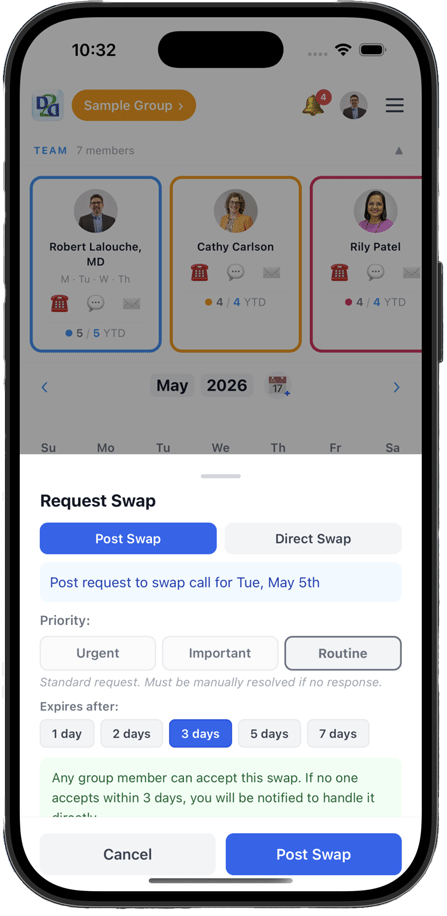
Yes. The Apple Watch companion shows who's on call today and lets you Call or Message them in one tap, send the Friday weekend sign-out, acknowledge alerts, and accept or decline call swaps — right from your wrist. A watch-face complication keeps today's on-call and your next shift one glance away. An Android smartwatch version is coming soon.
Can I send messages to my group from the app?
+
Yes. Send one-tap quick messages tailored to your specialty, or create your group's own custom presets (edit, reorder, and delete them anytime). Message on-call providers, nurses, staff, family, or viewers by app, text, or email — one person or everyone at once. A built-in Friday reminder helps make sure the weekend sign-out always goes out.
How do I mark myself out of office?
+
Two easy ways: tap any day on the calendar to mark yourself OUT, or set a whole range of OUT days for yourself at once. Auto-scheduling automatically skips your OUT days, and interactive tap-along tutorials walk you through it — along with how to swap call and weekend call.
Is my data secure?
+
OnCall AI uses strong security with encryption at rest and in transit, and is built with a no-PHI posture: it's a scheduling and coordination tool, not a place to store patient information. Coordination images are ephemeral — never kept in the database and deleted on delivery — so PHI doesn't accumulate the way it does in a group text. Fully HIPAA-compliant messaging is on our roadmap and something we build out for groups that need it.
How do I invite my group members?
+
Group leads can send invitations from the team management section. Members receive email invites with links to join. You control who has access and what permissions they have.
What if I need help?
+
We provide email support for all plans, and Member Manager subscribers get priority support. Check out our knowledge base or contact us anytime at support@oncall-ai.com.
Can I cancel anytime?
+
Absolutely. Cancel your subscription anytime from your account settings. Your access continues until the end of your billing period, and you won't be charged again.
Can our whole practice or hospital pay one bill?
+
Yes. A group can cover everyone on a single plan: $30 per on-call provider per year, plus a flat $200 per year that includes all of your schedulers, administrators, and viewers — no per-person fees for the rest of the team. Anyone already paying individually is consolidated automatically, with no double-charging and no lapse in access. Larger practices and hospitals can cover every group under one contract with volume pricing, billed by invoice or PO. Any provider, scheduler, or manager can set it up on the web; billing is then managed by whoever owns it — and you can name more than one billing manager.